Attack Surface Management (Surface Command) Overview
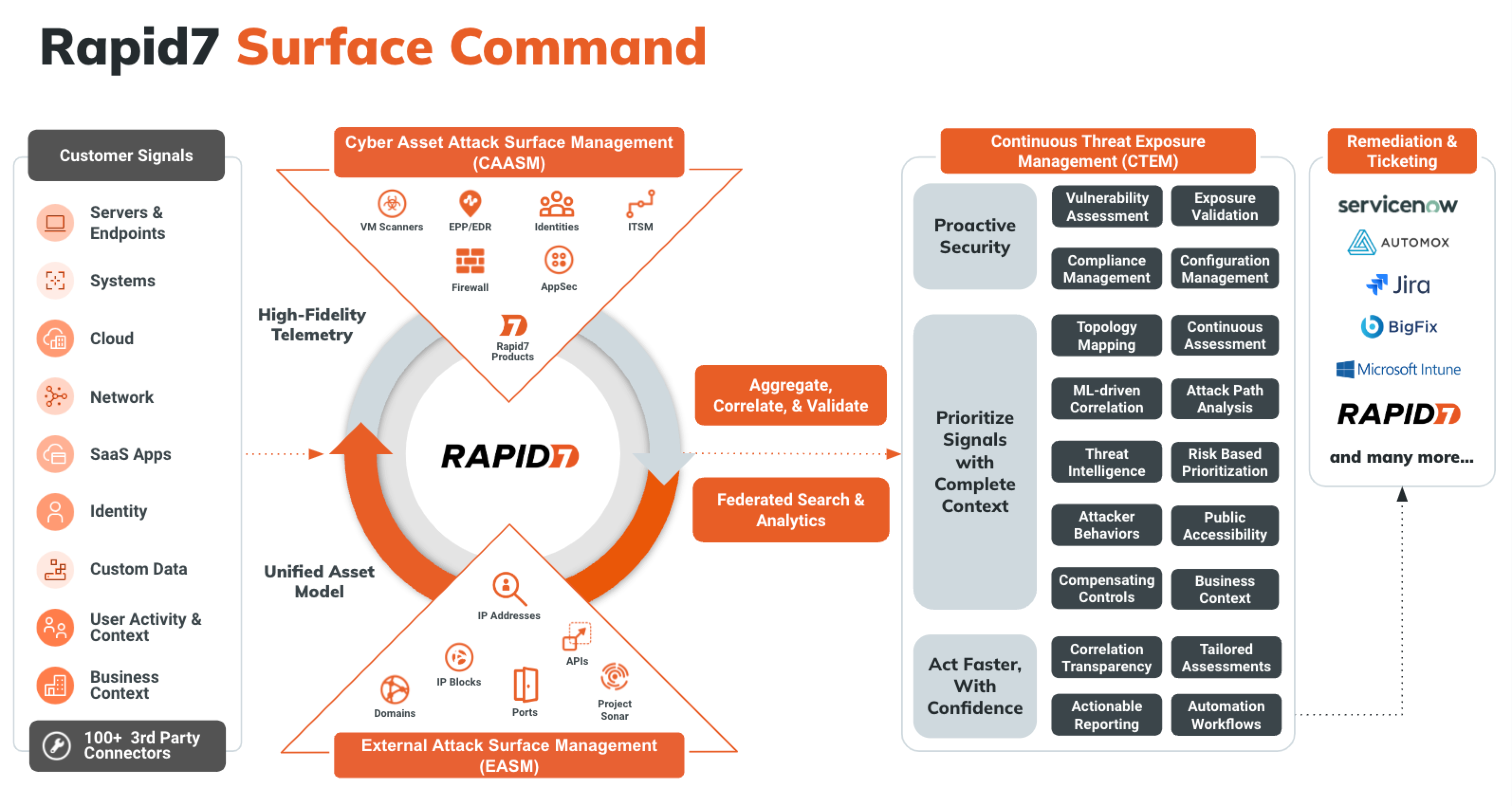
Attack Surface Management (Surface Command) breaks down data silos by combining comprehensive attack surface visibility across hybrid environments to build a dynamic 360-degree view of your entire attack surface in one place. External scans provide an adversary’s perspective on the attack surface, detecting and validating exposures while highlighting areas attackers are most likely to target.
Attack Surface Management (Surface Command) combines these external scans with a detailed inventory of your internal assets, no matter the security or IT tool used to scan them. This process delivers complete visibility into your attack surface without the risk of blind spots, unprotected assets, and ungoverned access. Understanding how assets are configured assists in quickly identify and address misconfigurations, shadow IT, and compliance issues. This integrated approach gives you a holistic view of your digital landscape, enabling proactive risk mitigation, threat prevention, and rapid response.
Attack Surface Management (Surface Command) is accessible from the Solutions sub-menu on the Command Platform. You can also navigate directly to points of interest within Attack Surface Management (Surface Command) by interacting with the Attack Surface Overview or the other Attack Surface-related navigation menu items.
Looking for Attack Surface Management (Surface Command) Access Control?
For detailed information on Attack Surface Management (Surface Command) entitlements and access control, visit Role-Based Access Control .
Key concepts and components
- Connector - A software component that enables Attack Surface Management (Surface Command) to collect data from an information source, such as vulnerability scanners, endpoint protection platforms, or cloud services. Each connector understands the API and data schema of its target source. Attack Surface Management (Surface Command) provides connectors for most major tools and supports custom connectors for enterprise-specific systems. Learn more about Connectors.
- Orchestrator - A software component deployed in your environment when Attack Surface Management (Surface Command) cannot access an information source directly. Orchestrators collect data from internal or private cloud sources and can also execute actions. After deployment, orchestrators are paired to Attack Surface Management (Surface Command), and one or more connectors are assigned to them.
- Profile - A configuration that contains credentials and import feeds for a specific connector.
- Import Feed - A scheduled task that runs a specific data ingestion job. A connector may have multiple associated import feeds.
- Attack Surface - Divided into internal and external components. The internal surface includes assets and identities. The external surface includes IPs, domains, certificates, and services exposed to the internet. Attack Surface Management (Surface Command) discovers external assets using domain and IP seeds. Learn more about your Attack Surface Management (Surface Command) attack surface.
- Asset - Any network-connected device, such as a server, workstation, mobile device, or printer. Assets are created automatically when data is ingested from connectors.
- Identity - A user-based entity like a username, service account, or shared mailbox. Identities can be human or non-human.
- Seed - Registered domains and public IP networks that help describe your external footprint on the Internet, which drive a discovery process that uncovers the operational subdomains, network services, and TLS certificates used by your organization. Seeds are manually entered or managed using a connector-specific dynamic seed query.
- Type - * A schema that defines how data is structured for a specific kind of asset or identity. Each connector introduces its own types, which Attack Surface Management (Surface Command) maps into standardized unified types (for example, Server, Identity, or Vulnerability). These unified types allow for cross-source correlation and query filtering. Explore unified properties.
- Query - A request written in Cypher or built using the graphical interface to retrieve data ingested by connectors. Queries cannot modify data but can be customized to extract specific insights. Prebuilt queries are available, and you can also create your own. Learn more about Queries.
- Reference list - External data imported using Excel or CSV files that augments connector data. Use reference lists to enrich queries (for example, to correlate network zones with business units).
- Dashboard - A customizable interface that displays key metrics and insights using widgets. Dashboards help you monitor your security posture visually. Learn more about Dashboards.
- Widget - A visual component that displays filtered results from a query using charts or graphs. Widgets can be customized to show counts, trends, or metrics. The default widgets on the Attack Surface Management (Surface Command) home page provide asset counts by unified type and are not editable.
- Workflow - A repeatable software process that executes steps based on query results. Workflows can be triggered automatically or manually to drive consistent response actions. Learn more about Workflows.
- Function - A reusable unit of code that interacts with remote systems to retrieve data or take action. Functions serve as the building blocks of workflows and are typically included with connector packages.
Data flow
Attack Surface Management (Surface Command) pulls data from the various connectors to provide a complete picture of your environment. Attack Surface Management (Surface Command) also monitors the data for changes, and optionally, takes action using workflows. There are several parts to this process:
- Ingestion - Attack Surface Management (Surface Command) pulls data using Connectors. Connectors’ ingestion can be scheduled to run at the time and frequency that is most appropriate for your environment (typically daily).
- Correlation - As data comes in from Connectors, Attack Surface Management (Surface Command) correlates the data that refers to the same object and provides a unified view of that object. Each unified view of an object is represented as an asset in the system. Each of the records that are determined to be referring to the same object are linked to that unified asset. Correlation also tracks relationships between data. If an information source indicates a relationship between two objects (for example, a Machine has a specific IP address or owner), those relationships are inherited by the unified object they are correlated with.
- Unified property fulfillment - Each unified asset has a list of properties that are common for that type of asset. The most appropriate value for each of those properties is determined by evaluating the related properties of the correlated information source records and choosing the best value to include in the property of the unified asset. When you run queries for unified assets and look at their details, you are presented with these fulfilled unified properties, but you can also display all of the information source properties that were considered.
Attack Surface Management (Surface Command) features
Rapid7 currently offers the following product options containing Attack Surface Management (Surface Command):