Explore unified properties
Unified properties allows Attack Surface Management (Surface Command) to normalize, query, and analyze data across many different tools and data sources. They ensure that assets, identities, vulnerabilities, and other objects are represented consistently even when an information source describes them differently. Unified properties enable you to:
- Query consistently across multiple data sources
- Build filters and dashboards without source-specific logic
- Analyze relationships between assets, identities, and vulnerabilities
- Reduce noise caused by inconsistent naming or formatting
Unified types
Attack Surface Management (Surface Command) integrates with a wide range of IT and security systems, including EDRs, vulnerability scanners, cloud provider APIs, CMDBs, and identity providers using connectors. Each of these systems has its own data model, naming conventions, and property formats.
To normalize this diversity, Attack Surface Management (Surface Command) uses unified types. A unified type represents a generalized object class, such as an Asset or Network, that exists across many sources. This model allows Attack Surface Management (Surface Command) to present a single, consistent view of your attack surface, regardless of where the data originated.
Each unified type defines:
- A standard set of unified properties
- The relationships it can have with other unified types
When more than one source record attempts to fulfill the same unified property, Attack Surface Management (Surface Command) uses a configurable fulfillment strategy to determine the best value. Depending on the property and configuration, the best value might be:
- The value from the highest-priority source
- The most recently updated value
- The maximum or minimum numeric value
- A logical true or false value
The selected best value is what you see by default when viewing details for a unified type in tables and panels.
How unified types relate to each other
Unified types are connected through defined relationships. These relationships allow you to explore how different parts of your attack surface interact. How entities interact across the attack surface:
- An Asset can be related to many Vulnerabilities
- An Identity can be associated with one or more Assets
- A Group can contain other Groups (hierarchical relationships)
These relationships are powerful when building queries that span sources and domains. For example, you can query for assets that have vulnerabilities above a specific CVSS score, even when those vulnerabilities come from multiple feeds, such as Tenable, Qualys, NVD, and CISA.
For more information on the unified types and how they relate to each other, review Access the unified model explorer.
Machine learning classifiers and asset characterization
Some unified properties are important for filtering, coverage analysis, and reporting, but are often inconsistent or overly verbose across data sources. To address this, Attack Surface Management (Surface Command) uses machine learning trained on anonymized real-world data to enhance how certain unified properties are fulfilled and normalized once source records have been correlated into a unified asset. To learn more about correlation, see Explore and manage correlation.
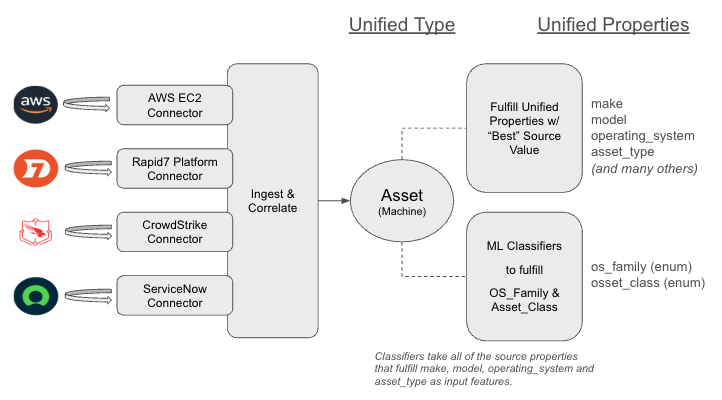
How this works:
Machine learning predictions are treated as another input source in the unified property fulfillment process.
- If no high-confidence source provides a value, the model’s prediction is typically selected as the best value.
- If a high-confidence source (such as an agent-based tool) provides authoritative data, that source may override the model’s prediction based on priority rules.
This approach balances automation with accuracy, ensuring that reliable source data always takes precedence while still providing consistent, normalized values when source data is incomplete or inconsistent.
Why this matters:
Machine learning–based normalization allows you to:
- Filter assets consistently by OS family or asset class
- Identify coverage gaps across tools (for example, servers without EDR coverage)
- Reduce complex query logic that would otherwise be required to normalize source values
By combining correlation, unified types, unified properties, and machine learning, Attack Surface Management (Surface Command) provides a scalable and accurate representation of your attack surface.
Access the Unified Model Explorer
You can explore unified types, properties, and relationships using the Unified Model Explorer.
To open the Unified Model Explorer:
- Go to Assets & Identities > Workspace, then click Unified asset model.
Asset types can relate to themselves
Types marked with an asterisk (*) can have a relationship with themselves. This is commonly used to represent hierarchies, such as nested groups.
When you select a unified type, the side panel shows:
- The list of standard unified properties for that type
- The source types that can fulfill those properties
Manage unified properties
If you have one of the following roles or permissions, you can control how Attack Surface Management (Surface Command) chooses the best value for a unified property when multiple sources provide data:
- Platform Administrator role
- Attack Surface Admin role
- Attack Surface Management Content View Only or Administer permission and the Attack Surface Management Property Fulfillment Administrator permission
To change property fulfillment behavior:
-
Open any Attack Surface Management page (for example, Assets, Workspace, Connectors, or Import Feeds), then go to Settings > Manage unified properties.
-
Select a unified type.
-
Click a unified property to open the Property fulfillment panel.
-
Choose a fulfillment strategy from the Best source menu:
- Top priority – Uses the first available value from the highest-priority source
- Most recently updated value – Uses the most recent source value
- Any true value – Chooses
TRUEif any source provides it - Any false value – Chooses
FALSEif any source provides it - Maximum value – Uses the largest numeric value
- Minimum value – Uses the smallest numeric value
- Latest date value – Uses the most recent date
- Earliest date value – Uses the earliest date
-
Click Apply.
Changes to unified property fulfillment affect how data is displayed, filtered, and aggregated across the platform.